Tuesday, 11 August 2009

Search Engine Blind Results Test - Kinda Like the Pepsi Challenge


Want to have some search fun? Then you have to try out Blind Search. This site lets you type in a search query and see the organic results for Google, Yahoo and Bing randomly in columns. Once you have reviewed and you think you know which results below to which search engine than click the button(s) to reveal if you are correct or not.

I have to admit that I am wrong more times than I am right when I am trying to guess which results go with which each and that Bing is actually the winner a majority of the time when I try to find the best and most relevant results for my search query. Pretty interesting and fun stuff...:-)

Check it out for yourself at - Blind Test

Monday, 10 August 2009

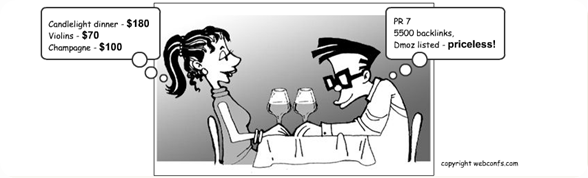
Great SEO Cartoon!


Sad, but true.....You know who you are.....:-)


Compare Search Engine Results - Google, Yahoo and Bing - biGoog


Ever wanted to compare search results between different search engines? If so, here is you answer - biGoog. This ingenious little site allows you to compare search results between the major search engines. Here are the combinations available:

- Google vs. Yahoo
- Yahoo vs. Bing
- Bing vs. Google

Check it out today for FREE at - biGoog

Friday, 7 August 2009

The Keys to Owning Your Organic Search Results Messaging


In the highly competitive online world don't leave it up to the search engines to determine what messaging appears for your website rankings within their search results (or SERPs). Take control of that messaging opportunity (while making sure not to disrupt your SEO efforts) by maximizing the content that appears. To make this easier for you I have included an outline for each of the major search engine inclusive of Google, Yahoo, Bing and Ask.com as to what each can handle and read.


Google:

- Google shows 69 characters (including spaces) for page titles.
- Google shows 156 characters (including spaces) for meta descriptions.
- Google does not read meta keywords.

It should also be known that if you don’t include a Meta Description or if Google feels a better description for your page could be given by using a web snippet, then the description shown can be up to 320 characters. Of course, they won’t be the characters that you choose so they might not best represent what you wish your audience to see in the search results.


Yahoo:

- Yahoo shows up to 72 characters (including spaces) for page titles (please note that PDFs can have up to 75 characters).
- Yahoo shows up to 161 characters (including spaces) for meta descriptions.
- Yahoo reads up to 12 unique meta keywords.


Bing:

- Bing shows 69 characters (including spaces) for page titles (Bing Webmaster Tools says it will read only 65, but that is inaccurate).
- Bing shows up to 185 characters (including spaces) for meta descriptions (Bing Webmaster Tools says it will read only 150, but that is inaccurate).
- Bing does not read meta keywords.


Ask:

- Ask shows 69 characters (including spaces) for page titles.
- Ask pulls the meta description for it’s results from a snippet of text from the page and can commonly display around 312 characters.
- Ask reads meta keywords, but total amount is unknown.

Track Your Keyword Rankings Across Many Search Engines Online for Free!


Keyword Envy is a great (and accurate) free online keyword ranking tool. Even though in free mode the tool is limited to 5 keywords. what I like most about it is that it can track against so many engines and variations of those engines. The current list is this:

- Google (US)
- Google (Canada)
- Google (UK)
- Yahoo
- MSN (separate from Bing, not sure why or how, but it is there)
- Live (separate from Bing, not sure why or how, but it is there)
- Bing
- Ask
- Gigablast (one of my favorite smaller engines)

They also offer an advanced service that combines analytics to tell you how strong your keywords are - how much potential traffic they bring in, what their bounce rate is, and more.....

Check it out today at - Keyword Envy

Sunday, 2 August 2009

Free PPC Return on Investment (ROI) Excel Worksheet


Our friends at TrueWebMoney.com have created a nice (and free) PPC ROI Excel worksheet. They advertise it as a Google AdWords Return On Investment Calculator, but it can be used for any PPC program or campaign (Yahoo, Bing, Ask, etc., etc.).

Here is the description from the site:
This awesome spreadsheet will give you your potential ROI for any type of Google AdWords campaign you run. You can also use it Yahoo, MSN, or any other pay per click (PPC) campaigns you currently (or plan to) utilize. You can use this spreadsheet for affiliate marketing, physical products, digital products, signups, just about any thing.

Simply enter your daily budget, cost per click, conversion rate, average ticket, profit percentage, fixed monthly costs, and processing fee rate and this nifty sheet will give you profit and expenses for daily, weekly, monthly and yearly. No expenses have been left out so this tool will give you an exact bottom line estimate.

Don't ever get burned using Google AdWords or any other PPC campaigns again. You need to know exactly what your bottom line is going to be to be successful with any type of PPC campaign.

This PPC tool will help you narrow down what type of conversion rate you will need to achieve to be profitable. It will also show exactly the max amount you can bid per click and still be profitable.

If you have never used Pay Per Click marketing then you absolutely must download this sheet right now. It has handy tool tips built in with complete instructions.

Check it out and download it for free today at - Free PPC ROI Excel Worksheet

Saturday, 1 August 2009

Google Quietly Launches a Facebook Page


I always just assumed Google had a Facebook page (was never really that interested to check it out before today). I guess my question is this, did Google not have a Facebook page until now because it did not feel it needed one or was it done out of spite that Facebook may become the king of data soon?

If Google was spiteful, it had many reasons for that including when Facebook snubbed Google for Microsoft (Microsoft is now an investor and runs external searches within Facebook with Bing). There is a great piece in Wired on this called - Great Wall of Facebook: The Social Network's Plan to Dominate the Internet - and Keep Google Out.


You can check out Google's new page here - Google on Facebook